
Radar tab
A radar of your own, dots on the game's minimap and tac map, arrows for enemies you can't see on screen, and a web radar you can share with friends.
The tab has four parts: Mini Radar, Tac-Map, Off-Screen Arrows and Web Radar. Players only show during a match.
Mini Radar
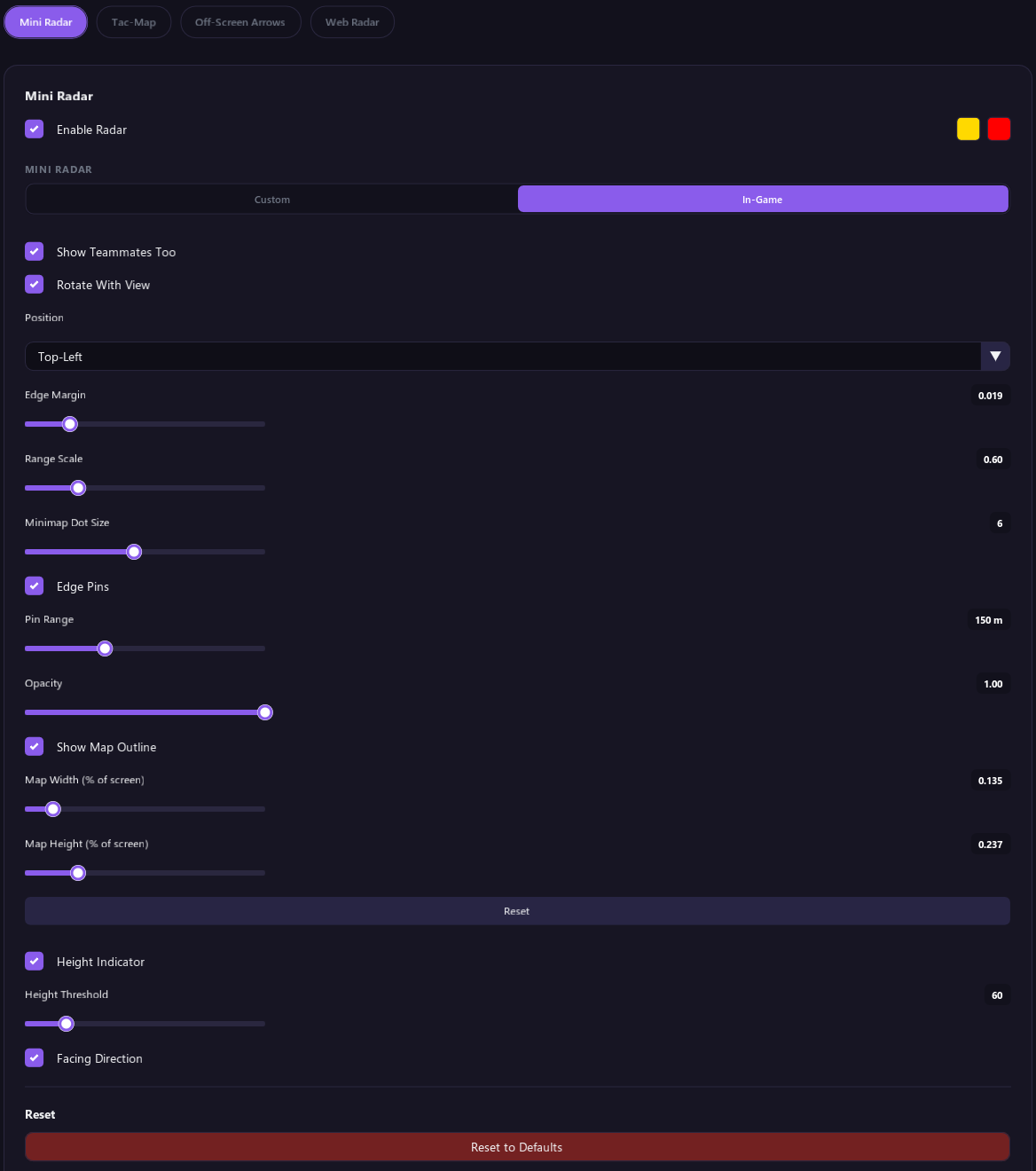
Tick Enable Radar, then pick a type under Mini Radar:
- Custom: a separate radar you can place anywhere on the screen.
- In-Game: draws player dots on the game's own minimap.
The two color squares next to Enable Radar are the dot colors for hidden and visible enemies.
Custom radar
| Option | What it does |
|---|---|
| Style | Forward-Up turns the radar with you, so your view points up. North-Up keeps north at the top. |
| Shape | Circle or square. |
| Size | How big the radar is. |
| Range | How far the radar reaches, in meters. Players farther away stay pinned to the edge. |
| Show Walls | Draws the walls around you on the radar. It needs Bone Visibility on in the ESP tab. |
| Background, Border, Crosshair, Direction Marker | How see-through each part of the radar is. |
| Position | Drag the radar with your mouse while the menu is open. Reset puts it back in the bottom left corner. |
Teammates on the custom radar follow the ESP tab's Team Check: when it is on, they are hidden.
In-game minimap
| Option | What it does |
|---|---|
| Show Teammates Too | Also draws your teammates. |
| Rotate With View | On: your view points up. Off: north points up. Match it to your game's minimap setting. |
| Position | A corner of the screen, or Custom to place it yourself. Edge Margin sets the gap from the edge. |
| Range Scale | Adjust until the dots match the minimap. |
| Minimap Dot Size | How big the dots are. |
| Edge Pins | Shows players just past the edge of the minimap as smaller dots on its edge, in their direction. Pin Range sets how far away a player can be and still get a pin. |
| Opacity | How solid the dots are. |
| Show Map Outline | Shows an outline you can line up with the minimap, using the Map Width and Map Height sliders. With Position set to Custom, Map Left and Map Top show too. Reset puts them back. |
Height and facing
- Height Indicator: shows a small triangle when a player is above or below you. Height Threshold sets how big the height difference must be.
- Facing Direction: shows which way each player is looking, on the radar and the maps.
Tac-Map
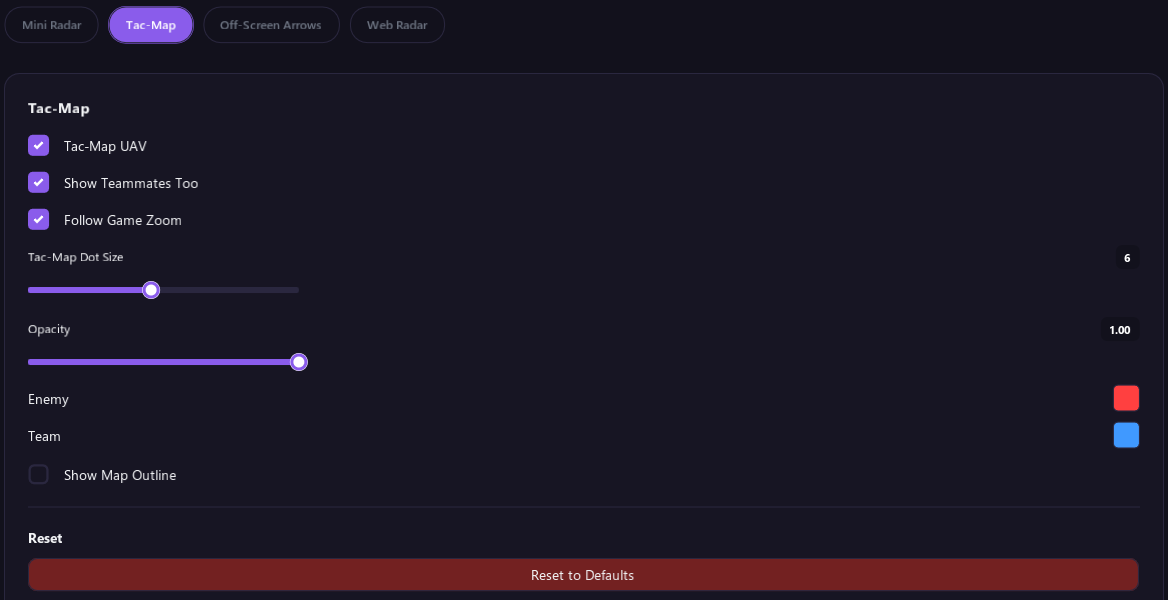
Tac-Map UAV draws players on the game's tac map while you have it open.
| Option | What it does |
|---|---|
| Show Teammates Too | Also draws your teammates. |
| Follow Game Zoom | Makes the dots follow the tac map's zoom and position. |
| Tac-Map Dot Size and Opacity | How big and how solid the dots are. At opacity 0 no dots are drawn. |
| Enemy and Team | The dot colors. |
| Show Map Outline | Shows an outline you can line up with the tac map, using the Map Left, Top, Width and Height sliders. Reset puts them back. |
Off-Screen Arrows
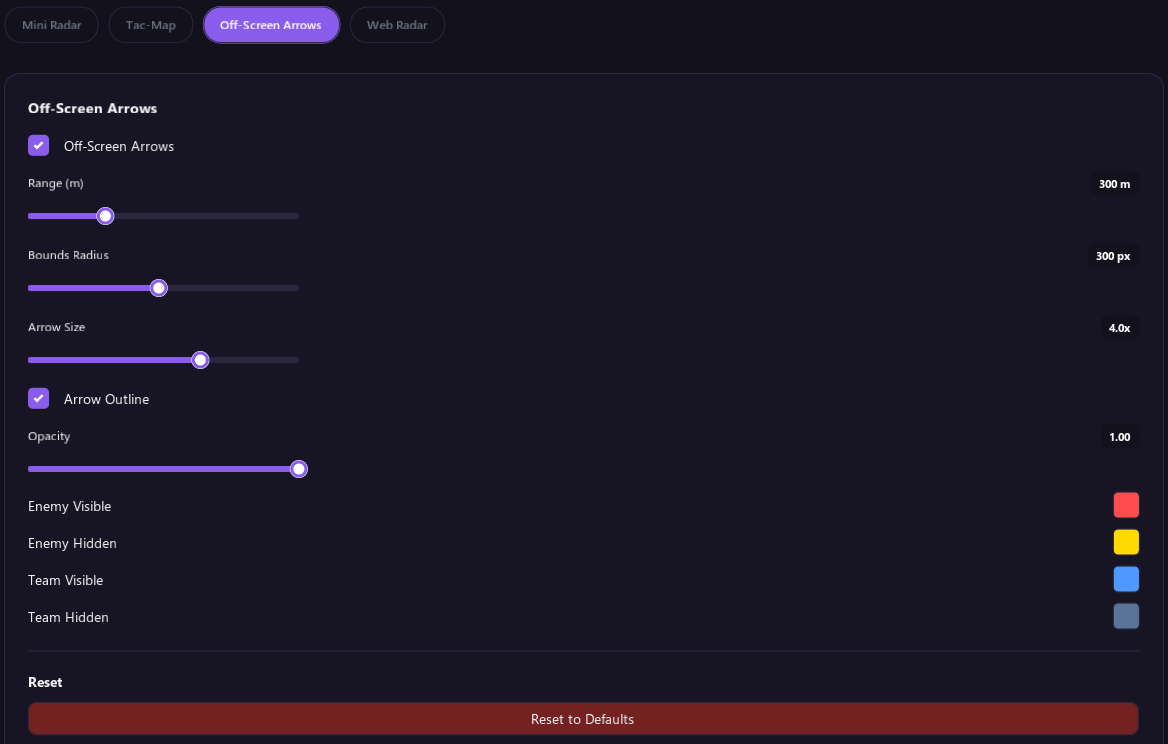
Arrows around the middle of your screen point toward enemies you can't see on screen. An arrow is longer when the enemy is closer. It sits toward the top when they are above you and toward the bottom when they are behind you.
| Option | What it does |
|---|---|
| Range | How far away an enemy can be and still get an arrow, in meters. |
| Bounds Radius | How far from the middle of the screen the arrows sit. |
| Arrow Size | How big the arrows are. |
| Arrow Outline | Adds a dark edge so the arrows are easier to see. |
| Opacity | How solid the arrows are. |
| Enemy Visible, Enemy Hidden, Team Visible, Team Hidden | Arrow colors. The Visible colors are used when that player is in plain sight or looking toward you. |
Web Radar
Share your radar with friends through a private link. They open it in any web browser, on a PC or a phone, and see everyone in your match on the map, live. Your IP address stays hidden from them.
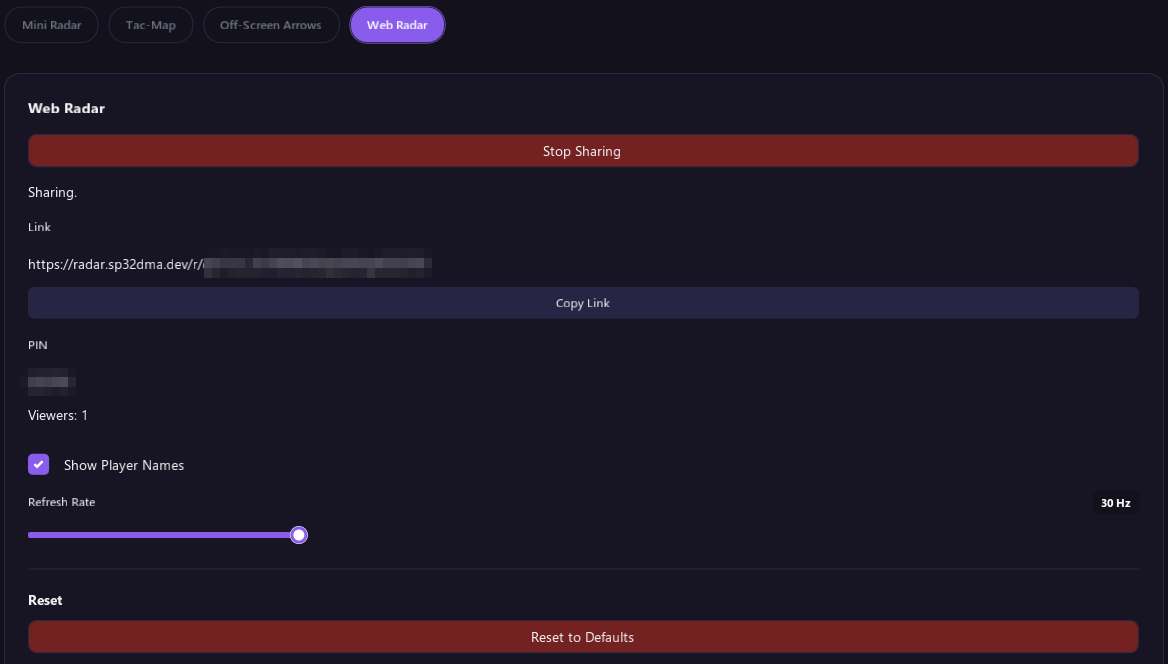
Sharing your radar
- Open Radar › Web Radar and click Start Sharing.
- A link and a PIN appear. Click Copy Link and send the link to your friends. The PIN is already part of the link, so they go straight to your radar.
- Viewers shows how many people are watching.
Someone who only has the link without the PIN on the end is asked to type the PIN, which is shown under the link.
| Option | What it does |
|---|---|
| Show Player Names | Viewers see player names when this is on. It is off by default. |
| Refresh Rate | How many times per second viewers get updates, from 2 to 30. 15 is the default. |
| Stop Sharing | Click it twice to stop. Your viewers see that you stopped, and the link stops working 3 minutes later. If you click Start Sharing again within those 3 minutes, you keep the same link. |
- Up to 8 people can watch at once.
- After 5 wrong PINs, the link is locked for 10 minutes.
- If the tool closes or loses its connection, the link stops working after 15 minutes. Every new share gets a new link and PIN.
- Viewers see players only while you are in a match. Between matches they see Waiting for a match.
Keep Radar › Tac-Map › Tac-Map UAV on. It is on by default. Without it, your viewers see players on a plain grid instead of the map.
What your viewers see
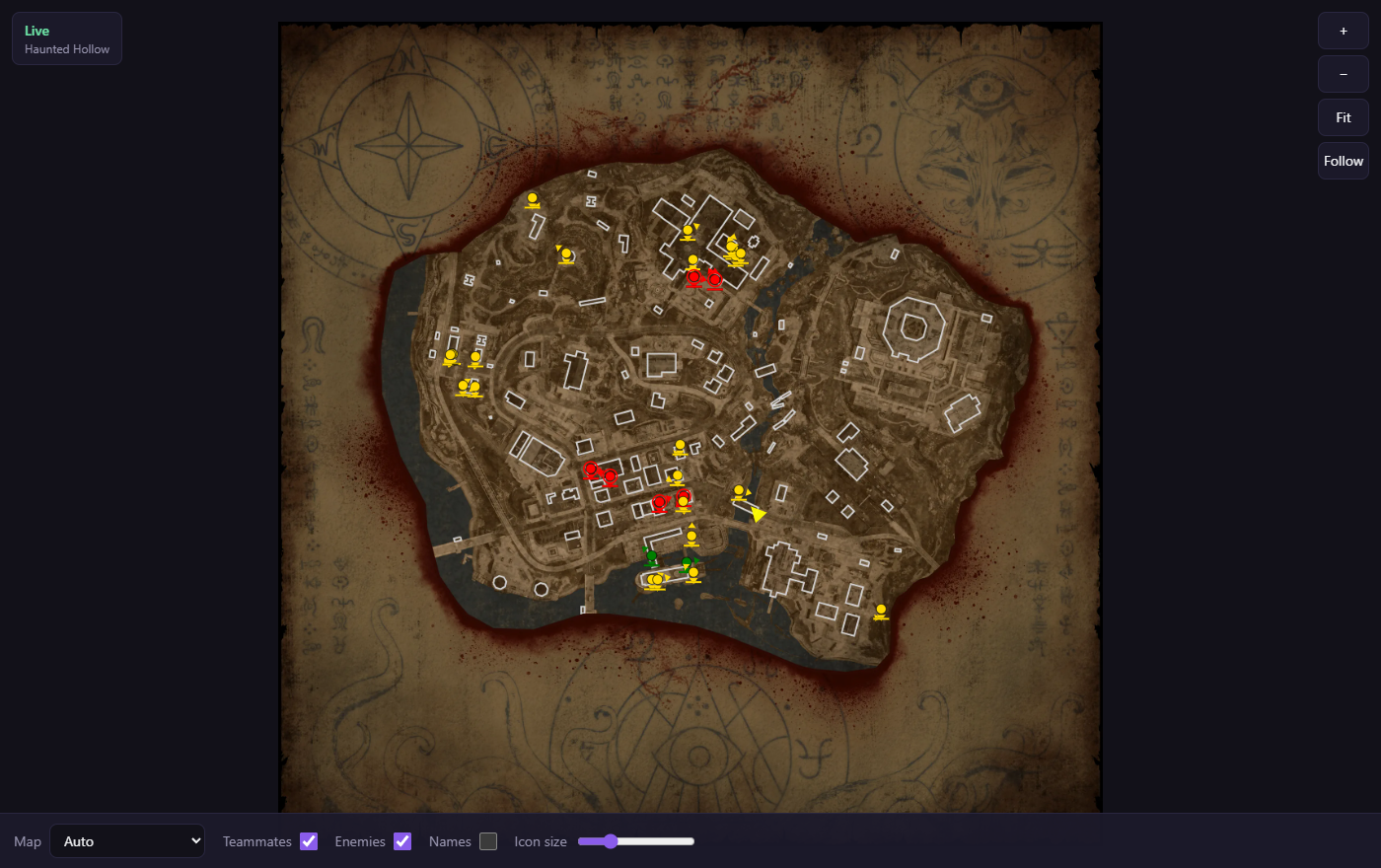
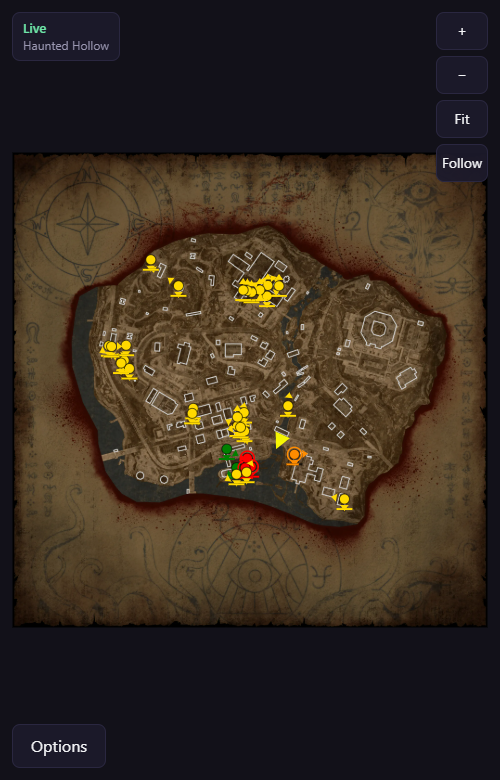
The radar shows the map of your match with north at the top. Your position is the yellow arrow. Enemies are red when they are in sight and yellow when they are behind cover, teammates are green, and downed enemies are orange. A small arrow on each dot shows which way that player is looking.
| Control | What it does |
|---|---|
| Map | Auto picks the map you are playing. Viewers can also pick one from the list. |
| Zones | Shows the Domination or Hardpoint zones on the map. |
| Teammates, Enemies, Names | Which players and labels show. Names only appear when you share them. |
| Icon size | How big the player dots are. |
| + and −, mouse wheel, pinch | Zoom in and out. The dots stay in the right place at any zoom. |
| Drag | Moves the map around. |
| Fit | Shows the whole map again. |
| Follow | Keeps your position in the middle. |
On a phone the options are behind the Options button at the bottom, and a double tap zooms in. Refreshing the page reconnects on its own.
| Viewer message | What it means |
|---|---|
| Live | Your match is showing. |
| Waiting for a match | You are sharing, but not in a match right now. |
| Host offline | Your tool is not connected right now. |
| Host stopped sharing | You clicked Stop Sharing. |
| Wrong PIN. | The PIN doesn't match. Check the link or the PIN. |
| Too many wrong PINs. Try again later. | The link is locked for 10 minutes. |
| This share is full. | 8 people are already watching. |
| This share has ended. | The link no longer works. Ask for a new one. |
Maps are shown for Black Ops 7 multiplayer and for Warzone: Avalon, Fortune's Keep, Haven's Hollow, Haunted Hollow, Rebirth Island and Verdansk. In other games the players show on a plain grid.
Tips
- If in-game minimap dots don't line up, set Range Scale first, then use Show Map Outline to fix the position and size.
- The minimap and tac map dots need the game's minimap or tac map to be on screen.
- The Reset section at the bottom of each part puts the whole Radar tab back to its defaults. Click Reset to Defaults twice.